iRacing cloud live timing for the whole race crew.
Share live iRacing positions, gaps, pit history and stint information in a browser. Give viewers a read-only timing board while authorised directors and stewards use separate remote controls. Available with EDR Broadcast League and Enterprise.
Public live timing and remote browser roles require League or Enterprise. The 14-day Pro trial covers Pro features. EDR Broadcast is currently in public beta.
One live race state, built for three audiences.
Viewers need a clear read-only running order. Commentators and teams need deeper stint, pit and lap context. Directors and stewards need controlled remote access to the production. EDR Broadcast connects those jobs without turning the public timing link into an operator control panel.
Follow the race from any browser.
Open the public timing link with no EDR account or desktop installation.
Read the strategy behind the order.
Use stint lengths, pit history, lap history and comparisons to explain how the race is developing.
Operate without sharing the stream PC.
Directors and stewards use their assigned browser controls while the host remains connected to iRacing.
Live timing that explains more than position.
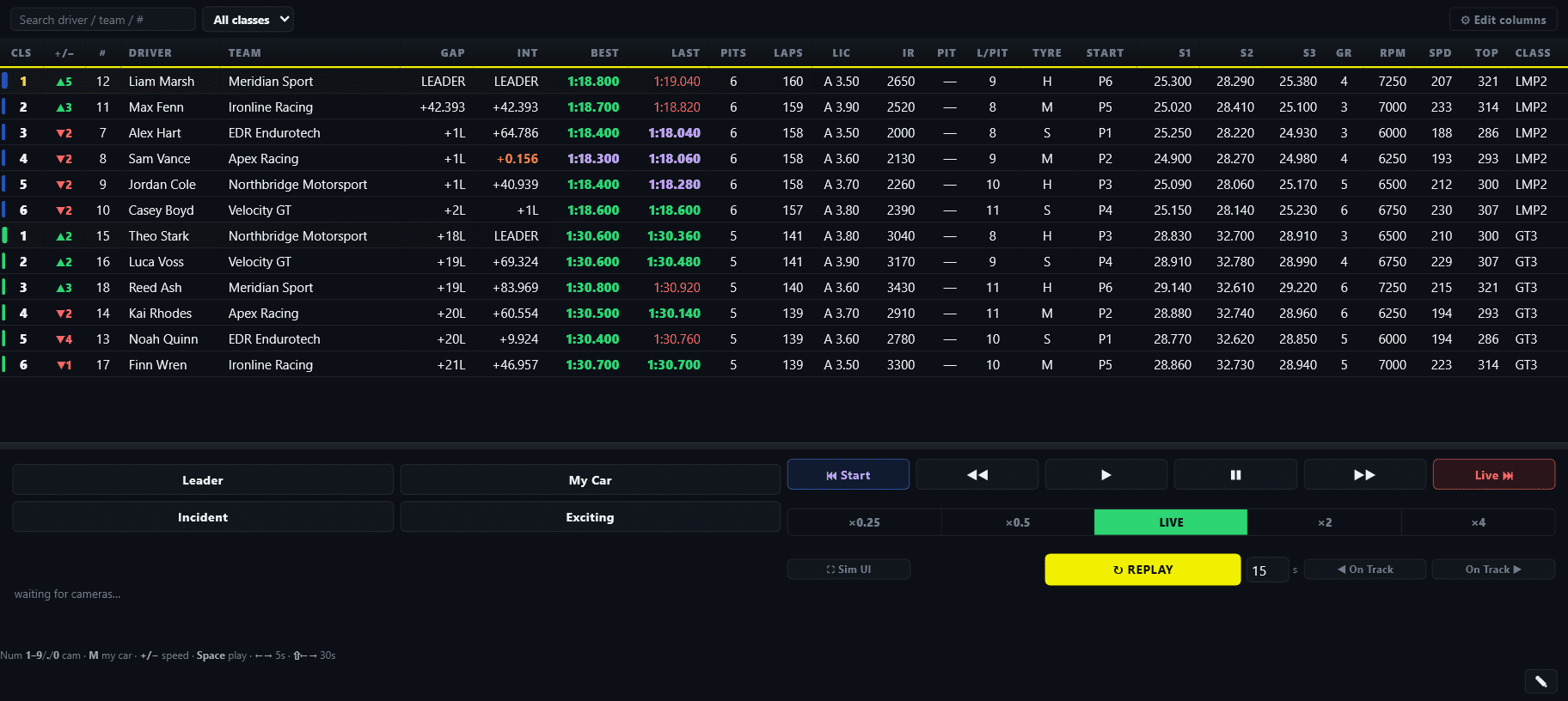
The browser board gives leagues and endurance events a shareable view of the active session. It combines the current running order with the pit, stint and lap information that helps people understand why the order is changing.
Positions, gaps and intervals.
Track the live classification, gaps, intervals, laps and session results from a browser outside the broadcast picture.
Stint lengths and pit history.
See how long each car has been running, when it stopped and the history behind its current track position.
Lap history and comparison.
Compare drivers and review the run of laps behind the latest number instead of judging pace from one isolated lap.
The public board stays separate from the broadcast overlay.
OBS and vMix can show the curated on-air graphics while viewers, commentators and teams explore the deeper timing view in their own browser. The director can keep telling the race story without crowding the programme picture.
The host stays with iRacing. The crew can be anywhere.
EDR separates the Windows host, remote operator roles and public viewer timing. That lets a distributed crew work around one session without handing everyone access to the streaming computer.
Connect EDR to the live session.
The Windows app reads iRacing, drives the browser-source graphics and keeps authority over the production.
Control cameras remotely.
A director can use the browser control room while the host continues running iRacing and the stream.
Join the race operation online.
Remote steward roles can follow the session and support official calls without sitting at the broadcast PC.
Open the public timing link.
Viewers and teams receive a read-only race view, not the controls used by the production crew.
Stints and pit cycles become part of the story.
Position alone can be misleading during a long race. Cars may be on different stop counts, fuel windows or driver rotations. EDR adds the context needed to explain an endurance race while the strategy is still unfolding.
Timing that supports your production. EDR Broadcast helps commentators explain the pit cycle, producers follow the current driver and remote crew stay connected to the active session. Public timing gives the audience that race context alongside the on-air graphics.
Watch the pit cycle.
Use stop history and stint length to separate temporary track position from the likely order after the cycle.
Compare sustainable pace.
Lap history and driver comparison give commentators more context than a single fastest-lap number.
Support a global crew.
Directors, stewards, commentators and teams can follow the same event without being in the same room or country.
Public timing without exposing production controls.
The audience receives a read-only timing page. EDR’s public timing page does not run analytics, and account, licensing and operator-control information is kept out of the viewer feed.
Read-only for viewers.
The public board is for following the race. Camera, replay and race-control actions stay with authorised operator roles.
No viewer analytics.
The public timing page is not used to track viewer behaviour or build an audience analytics profile.
Close the room after the race.
End the cloud room when the session is finished so the public feed no longer presents the event as live.
Cloud timing is connected to the rest of the show.
EDR Broadcast does not treat live timing as a separate add-on. The same Windows app also manages the cameras, incidents, replays, race-control workflow and browser-source graphics used in OBS or vMix.
Automated cameras, manual control.
Automatic direction can follow the race while a remote operator watches timing, prepares graphics or takes manual control.
A complete on-air graphics package.
Use browser-source leaderboards, battles, flags, results, timing, telemetry and track maps alongside the public board.
Find action away from the live shot.
Whole-field incident detection, a filterable log and jump-to-incident help the producer recover important moments.
iRacing cloud live timing questions.
What is iRacing cloud live timing?
It publishes selected live session data from the iRacing host to a browser page that viewers, commentators and teams can open away from the broadcast PC.
Do viewers need to install anything?
No. The public timing board opens from a browser link and does not require an EDR account.
What can the public timing board show?
The board can show the running order, positions, gaps, intervals, stint lengths, pit times and stop history, driver lap comparison, lap history and session results.
Can a director control the broadcast remotely?
Yes. A director can use the browser control room while the Windows host remains connected to iRacing and the streaming software.
Does it work for endurance races?
Yes. Stint length, pit-stop history, lap history and driver comparison make the board especially useful when strategy changes the meaning of the live running order.
Does cloud timing replace OBS or vMix?
No. EDR supplies the timing, remote controls and transparent browser-source graphics. OBS or vMix still captures the simulator, mixes the programme and sends the stream.
Does the public page expose production controls?
No. The viewer board is read-only. Remote camera, replay and race-control actions remain available only through the appropriate operator role.
Which EDR Broadcast plan includes cloud timing?
Public live timing, remote browser control and the distributed crew workflow are League features. See the current pricing page for plan details.
Put your iRacing timing and crew in the cloud.
Download EDR Broadcast, connect the Windows host to iRacing and rehearse the viewer and operator links before race night. Choose League when you need public live timing, remote directors, remote stewards and multi-PC production.