iRacing oval and NASCAR-style broadcasting
How to Build an iRacing NASCAR-Style Oval Broadcast Around a Scoring Pylon
Plan an iRacing oval broadcast with a scoring pylon, caution count, stage graphics, restart grid and clear race-procedure information.
Quick answer
Run a scoring pylon rather than a scrolling timing tower, show the stage plan when the league uses stages, keep a persistent caution count, identify the free pass and wave-around under yellow, use car-number artwork alongside driver names, and reserve story graphics for cautions rather than leaving them on air. Oval broadcasting is a race-procedure problem before it is a graphics problem.
Reviewed 29 July 2026
This guide covers oval and NASCAR-style league broadcasts in iRacing. EDR Broadcast is currently in public beta, so check the current pricing and beta notes before a major event.
Which oval graphic are you missing?
Running order for a full field
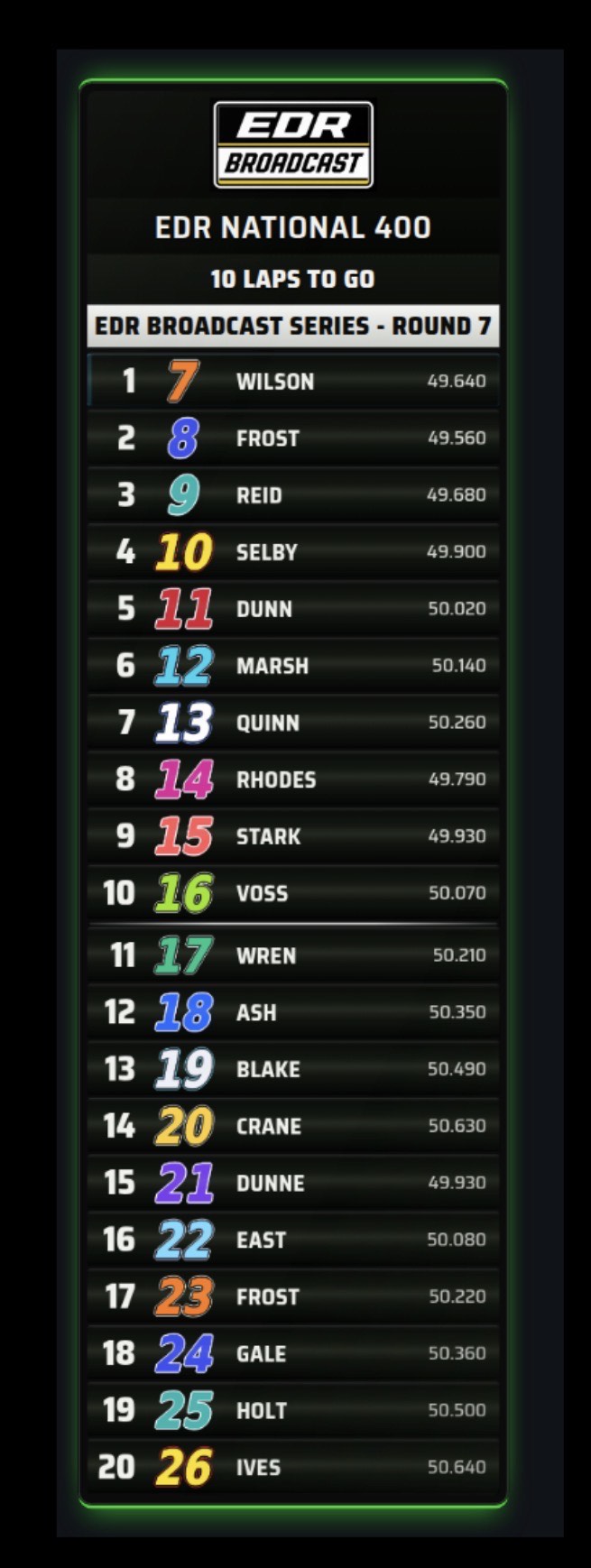
A 30 or 40 car oval field will not fit in a readable tower. A scoring pylon pins the leaders and cycles the rest, so the top of the race never disappears while positions 21 to 40 are shown.
Stage state
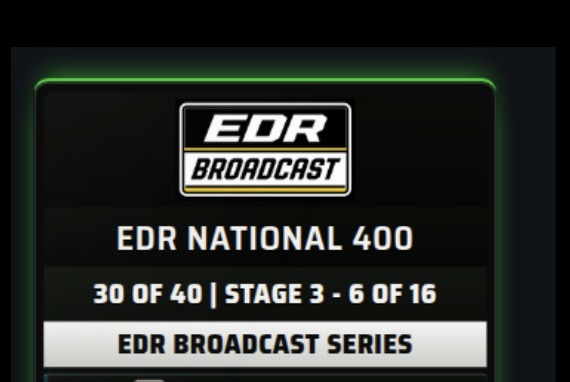
When a league uses stages, viewers need to know which stage is running, how many laps remain and when the stage break is coming. That belongs in the pylon header plus a small laps-to-stage-end chip.
Caution state and caution history
Two separate jobs. The board should read as yellow the moment the caution flies, and a small persistent bug should carry the running caution count for the whole race.
Free pass and wave-around
This is one of the easiest oval procedures for viewers to lose track of. Name the car that gets the lap back, list the cars waved around, and use your league’s own wording rather than assuming everyone says the same thing.
Restart lineup
Double-file restarts are a set piece. A restart grid graphic in the closing laps of a caution is often the most watched ten seconds of the yellow.
Superspeedway packs
At Daytona or Talladega, position is less useful than pack shape. A draft-pack strip that clusters cars by physical track order tells the story that a positional list cannot.
Story stats
Laps led, lead changes, cautions for laps. These are yellow-flag graphics, not permanent furniture. Show them when there is time to read them.
Four things an oval broadcast shows that a road-course tower does not
Stage structure
When stages are part of the format, the race becomes a series of segments with points and scheduled breaks. The graphics should always make the current segment clear.
Caution economy
Yellows reset the race. Laps lost, laps returned, pit cycles and restart order all matter more than a tenth of a second in sector two.
Track position over gap
On a short track or a superspeedway, a small time gap may say little about the battle. Position, lapped traffic and pack membership carry more of the story.
Identity by number
Car numbers are often recognised faster than surnames in oval racing. Number artwork on every row helps viewers identify a car at a glance.
Each of those jobs needs its own visual treatment and trigger. That is why an oval package is not simply a recoloured road-course theme. The layout, data column and flag behaviour all change.
What the Oval Pylon theme puts on screen
Oval Pylon is EDR Broadcast’s US oval look: near-black plates with a faint olive tint, silver type and a bright green edge glow, built around a scoring pylon rather than a scrolling tower.
The oval overlay set, by job
| Overlay | What it shows | When to use it |
|---|---|---|
| Scoring pylon | Running order, fixed leaders plus rotating field, stage header | The permanent board for the whole race |
| Stage counter | Current stage and lap, counting down to the stage break | Green-flag running, especially the ten laps before a break |
| Caution counter | A small persistent count of full-course cautions | All race, as a corner bug |
| Free pass and wave-around | The car getting its lap back plus the cars waved around, with your league’s own wording | Under caution, before the restart |
| Restart grid | The double-file lineup for the coming restart | Late in the caution, once the order settles |
| Draft packs | Packs clustered by physical track order, with car counts and gaps between them | Superspeedways, green-flag running |
| Laps led | The dominant leader’s number, name and laps led | Under caution or at a natural lull |
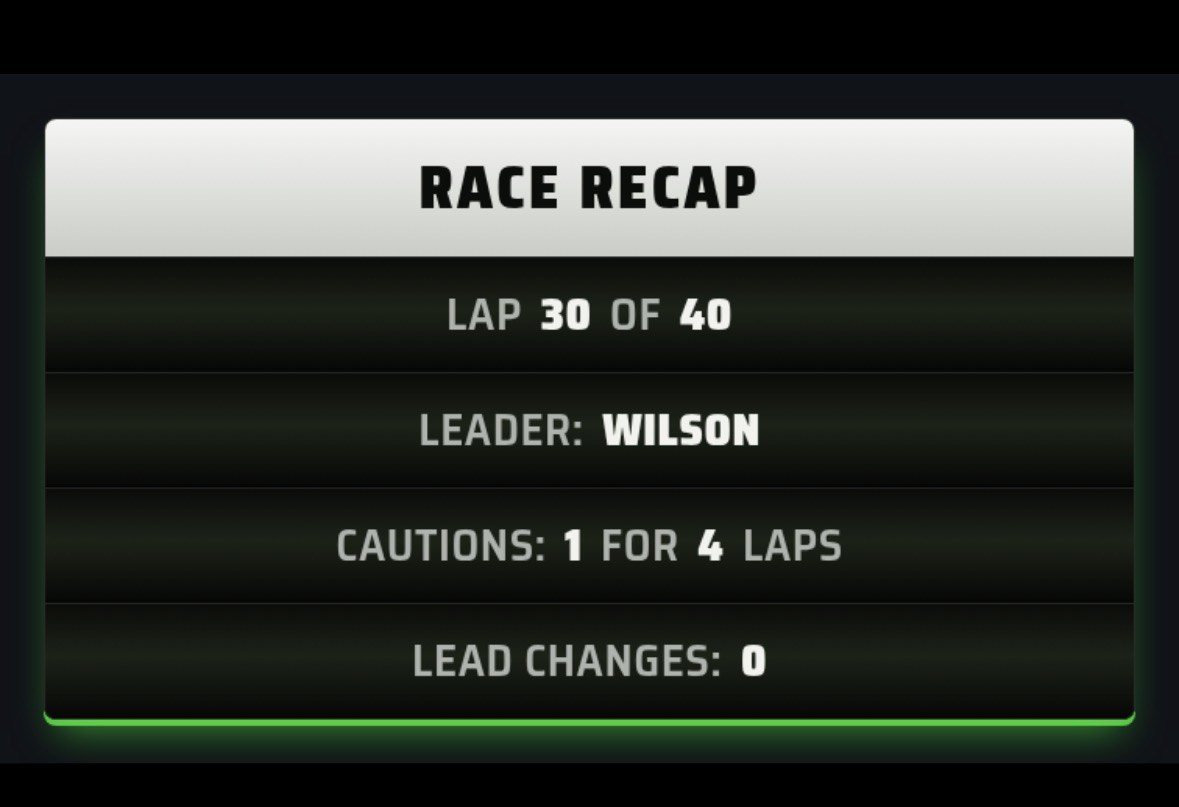
| Race recap | Lap N of M, leader, cautions for laps, lead changes | Stage breaks and mid-race resets |
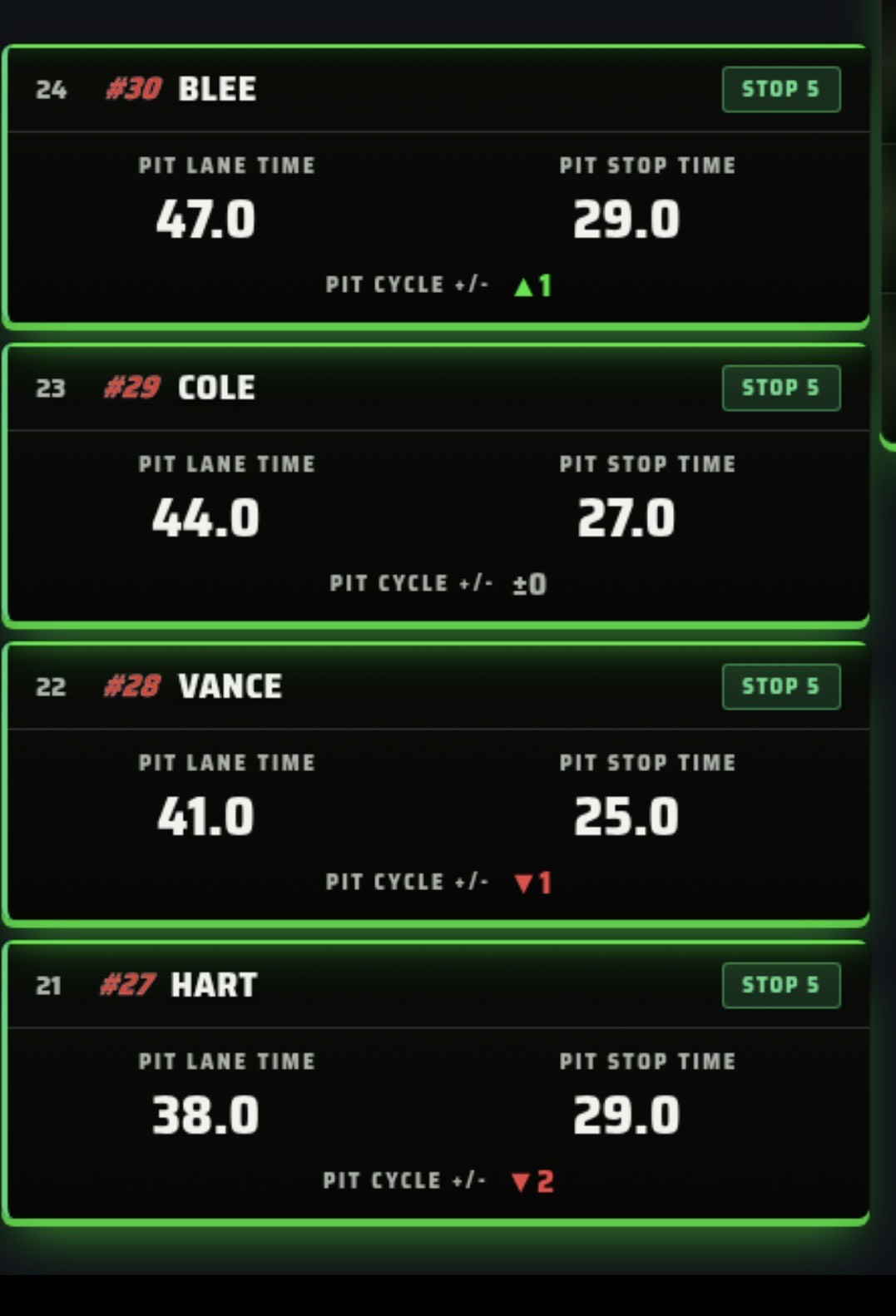
| Pit pop-up | Stacked stop timings as cars cycle through the pits | Every pit cycle, green or yellow |
One stage plan should drive the graphics and the caution
A common oval production error is a stage plan that lives in two places. The graphics say the stage ends on lap 50 because someone typed 50 into an overlay, and race control throws the caution on lap 52 because someone else typed 52 into a spreadsheet. Viewers notice immediately.
In EDR Broadcast the stage laps are entered once. They can be derived automatically or set manually, and the same plan can optionally arm the automatic race-control scheduler so the entered laps drive the on-air stage header and the actual caution. That arming is off by default: the graphics are display-only until you deliberately switch it on, which is the right default for a first event.
Whatever tool you use, the rule holds. One source of truth for stage laps, verified in practice before the race, and a plan for what happens if a natural caution lands one lap before a scheduled one.
Arm the right overlay at the right moment
| Race phase | On air | Why |
|---|---|---|
| Pre-race and grid | Grid intro, event header, stage plan | Set the format before green so the stage graphics make sense later |
| Green-flag running | Pylon, stage counter, caution bug, packs at superspeedways | Continuous state only. Keep the frame clear for racing |
| Caution thrown | Yellow takeover, then pit pop-ups as the field cycles | The board should read as yellow instantly, not after a page rotation |
| Mid-caution | Free pass and wave-around, laps led, race recap | This is usually the best window for a readable stat card |
| Restart approaching | Restart grid, then clear the frame | Show the lineup, then get out of the way before green |
| Stage break and finish | Race recap, results, podium | Segment endings are the natural place for summary graphics |
Story graphics such as laps led and the race recap can be armed to reveal on a caution and hide themselves again after a set hold. That reduces the risk of carrying a stat card into the restart.
How EDR Broadcast handles the oval look
Oval Pylon is a built-in theme. Selecting it changes the board type rather than just the colours: the pylon replaces the standard timing tower in race sessions, and the supporting oval overlays inherit the same plate, glow and number treatment so the package reads as one show.
New overlays ship switched off. Nothing appears on your stream because you updated the app. You arm each oval overlay in settings when you want it, which is deliberate: an overlay that turns itself on during a live broadcast is a worse problem than a missing one.
Under the current plan structure, Pro includes every theme and all 30+ overlays. League includes everything in Pro, then adds remote browser control, public live timing and more production capacity. The product is in public beta, so check the live pricing page and test the complete oval package in a practice session before a championship opener.
The oval race-night rehearsal
Enter the stage laps once, and confirm the header and the stage counter both read what race control expects.
Load the entry list and check every car number resolves to artwork, not a text fallback.
Run a full rotation cycle with the real field size and confirm the lower pages stay readable at stream bitrate.
Throw a test caution and confirm the pylon changes state immediately and clearly.
Check the free pass wording matches your rulebook. If your league says lucky dog, the graphic should say lucky dog.
Rehearse the restart sequence: show the grid, clear the grid, then leave a clean frame before green.
If you are at a superspeedway, confirm the pack strip clusters sensibly with the real car count before you trust it on air.
Write down who calls each graphic, and what happens to the show if that person drops out mid-race.
Frequently asked questions
Do I need a different theme for iRacing NASCAR broadcasts?
You need a different board type, not just a different palette. A scoring pylon with a stage header, caution takeover and number artwork carries oval information that a road-course timing tower has no place to put.
Can iRacing overlays show stage cautions?
Yes. Stage boundaries can be entered manually or derived, and shown as a stage header plus a laps-to-stage-end chip. Keep the graphic and the actual caution driven by the same numbers.
How do I show the lucky dog or free pass on stream?
Use a dedicated free-pass and wave-around banner under caution, and set the label to your league’s own wording. Show it once the order is stable, not the instant the yellow flies.
Will a scoring pylon fit a 40-car field?
Not all at once, and it should not try. A fixed top ten with rotating pages of ten keeps type large enough to read on a phone while still cycling the full field.
Do oval overlays work on road courses?
The pylon and stage graphics do. Some overlays are deliberately restricted by track type, such as pack clustering defaulting to superspeedways only, with an operator override if you want them elsewhere.
Which EDR Broadcast plan includes the Oval Pylon theme?
The current pricing page includes all themes and all 30+ overlays with Pro. League includes everything in Pro and adds remote production features. Check the live pricing page because beta packaging may change.
Can I use my league’s own car numbers and logos?
Yes. A default number set ships with the theme, and uploaded artwork replaces it per number. Number profiles can be switched between championships, and the header carries an event title and logo panel.
Build the rest of the oval show
Get the scene layer right first with the OBS setup guide, compare packages in the iRacing overlay software roundup, let the auto-director carry camera work while you call graphics, and rehearse the caution and replay handoff before your first stage break. Give viewers a read-only live timing page so the pylon does not have to answer every question on screen.
Give your oval league a proper scoring pylon
EDR Broadcast Pro includes all themes and overlays, including the Oval Pylon package. League adds remote operators, public live timing and more production capacity for a connected crew.
Compare Pro and League