iRacing broadcast software 2026
iRacing Broadcast Software: The EDR Production Workflow
Explore EDR Broadcast’s approach to iRacing production, combining overlays, cameras, incident review and replay controls for leagues and small crews.
Quick summary
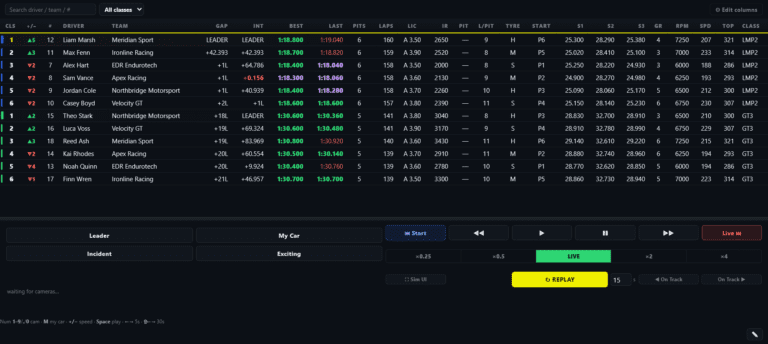
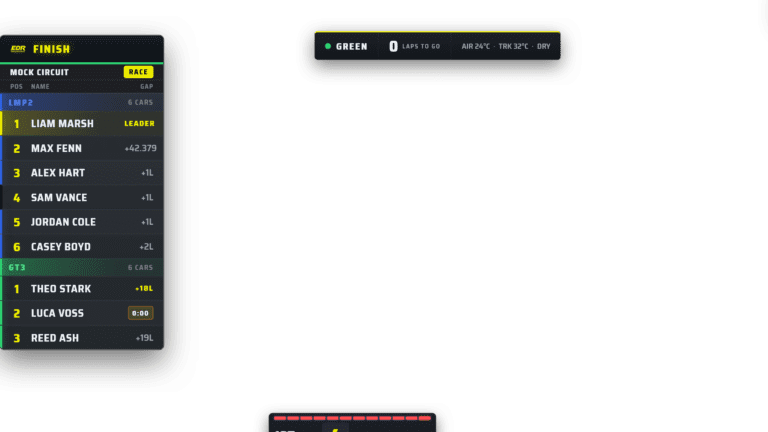
EDR Broadcast is an iRacing broadcast software tool for leagues, endurance teams and solo producers. It combines a WYSIWYG Theme Editor, 46 OBS-ready overlays, 23 ready-made themes, Auto-Director, incident detection, replay workflow and race-control messaging in one race-night production system.
Choosing the best iRacing broadcast software in 2026 is not just about finding a timing tower. A proper league broadcast needs clean graphics, smart camera direction, replay control, incident awareness, sponsor space and a workflow that still holds together when the race gets chaotic.
Updated 22 August 2026 after the release of the EDR Broadcast WYSIWYG Theme Editor
This article explains why we built EDR Broadcast and what we think good production software should do. For a vendor-by-vendor market review, use the separate 2026 comparison page. EDR is currently in public beta.
What is breaking on your race night?
The camera keeps missing battles
Start with Auto-Director and manual override. Graphics cannot rescue a broadcast that is looking at the wrong car.
Viewers cannot understand the race
Prioritise readable class timing, focused-driver context, flags and replay labels before adding more decoration.
One operator is doing five jobs
Look for an integrated control room, remote helper access and safe automation. That workload problem is the reason EDR exists.
The complete EDR difference
Custom graphics and race direction in one app.
The WYSIWYG Theme Editor removes the old choice between deep visual customisation and an integrated control room. Build the league look, send 46 coordinated overlays to OBS or vMix, let Auto-Director find the racing, log likely incidents and control the replay from the same Windows application.
Download freeWhy EDR Broadcast was built
EDR Broadcast came from a real team problem. Endurotech Racing runs long iRacing endurance events, including 24 hour races, where the broadcast can be almost as demanding as the race itself. Getting good camera angles, following the right battle and keeping viewers informed took too much manual work.
During endurance races, every extra app and every extra manual task matters. Heavy broadcast setups can use precious CPU resources, operators get overloaded, and the best race moments are easy to miss while someone is switching windows, chasing cameras or trying to find the right replay.
So a couple of clever Endurotech Racing team members decided to build our own tool. The goal was simple: create an iRacing broadcast control room that handles the repetitive, time-sensitive parts of the show, so league organisers and commentators can focus on telling the story of the race.
What makes good iRacing broadcast software in 2026?
A good broadcast tool should make the race easier to follow. Viewers need to know who is fighting, what class they are in, what lap the race is on, when penalties happen and why the camera has moved to a certain battle.
For iRacing league broadcasts, the strongest tool must solve both jobs: give the league complete visual ownership and reduce the operator workload behind the show. EDR Broadcast now does both with its WYSIWYG Theme Editor and integrated production control room. A clean timing tower still leaves the operator switching cameras, watching incidents, triggering replay graphics, checking Discord, typing race-control messages and feeding information to commentators.
That is why EDR Broadcast is built around production control rather than just visual output. The graphics matter, but the real win is reducing the amount of work needed to keep the broadcast moving.
Why EDR Broadcast is different
EDR Broadcast is designed as a control room rather than a simple overlay pack. It combines OBS-ready browser sources with live race tools, Auto-Director logic, replay workflow, incident awareness and league operations features.
iRacing broadcast software comparison
Different iRacing tools suit different jobs. Some are excellent for timing. Some are strong for analysis. EDR Broadcast is focused on the live production side of league and endurance racing.
| Tool | Best fit | Main strength |
|---|---|---|
| EDR Broadcast | League and endurance broadcast production | Full race-night control room with OBS overlays, Auto-Director, replay workflow and race-control messaging. |
| ATVO | Experienced manual broadcast crews | Established iRacing broadcast workstation for teams who already know the workflow. |
| SDK Gaming | Polished timing and streamer overlays | Strong live timing, HUD and viewer data surfaces. |
| JRT | Timing, strategy and analysis | Detailed timing data and useful information for drivers, commentators and race review. |
| Native iRacing plus OBS | Simple DIY streams | Cheap and flexible, but the operator handles cameras, graphics, replay and comms manually. |
Why overlays alone are not enough
Most league broadcasts start with overlays. A timing tower, relative display and flag graphic immediately make the stream look more professional. But as soon as the racing gets busy, overlays are only one part of the job.
A proper broadcast needs story selection. Who is closing in? Which class leader is under pressure? Has an incident changed the race? Is a penalty coming? Should the replay go now or after the pit cycle? This is where a tool built around production control has an advantage over a basic overlay package.
Built for OBS, leagues and 24 hour races
EDR Broadcast is built around browser-source friendly graphics so it can sit cleanly inside an OBS production. That matters because OBS is still the common base for Twitch, YouTube and Facebook streams.
The app is also shaped by endurance racing. In a 24 hour race, the broadcast tool has to keep working when the field spreads out, drivers swap, incidents happen overnight and the operator needs quick access to the important moments.
That is why the goal is not to replace the producer. The goal is to reduce the workload, surface better race stories and make it easier to produce a professional-looking iRacing broadcast with a smaller crew.
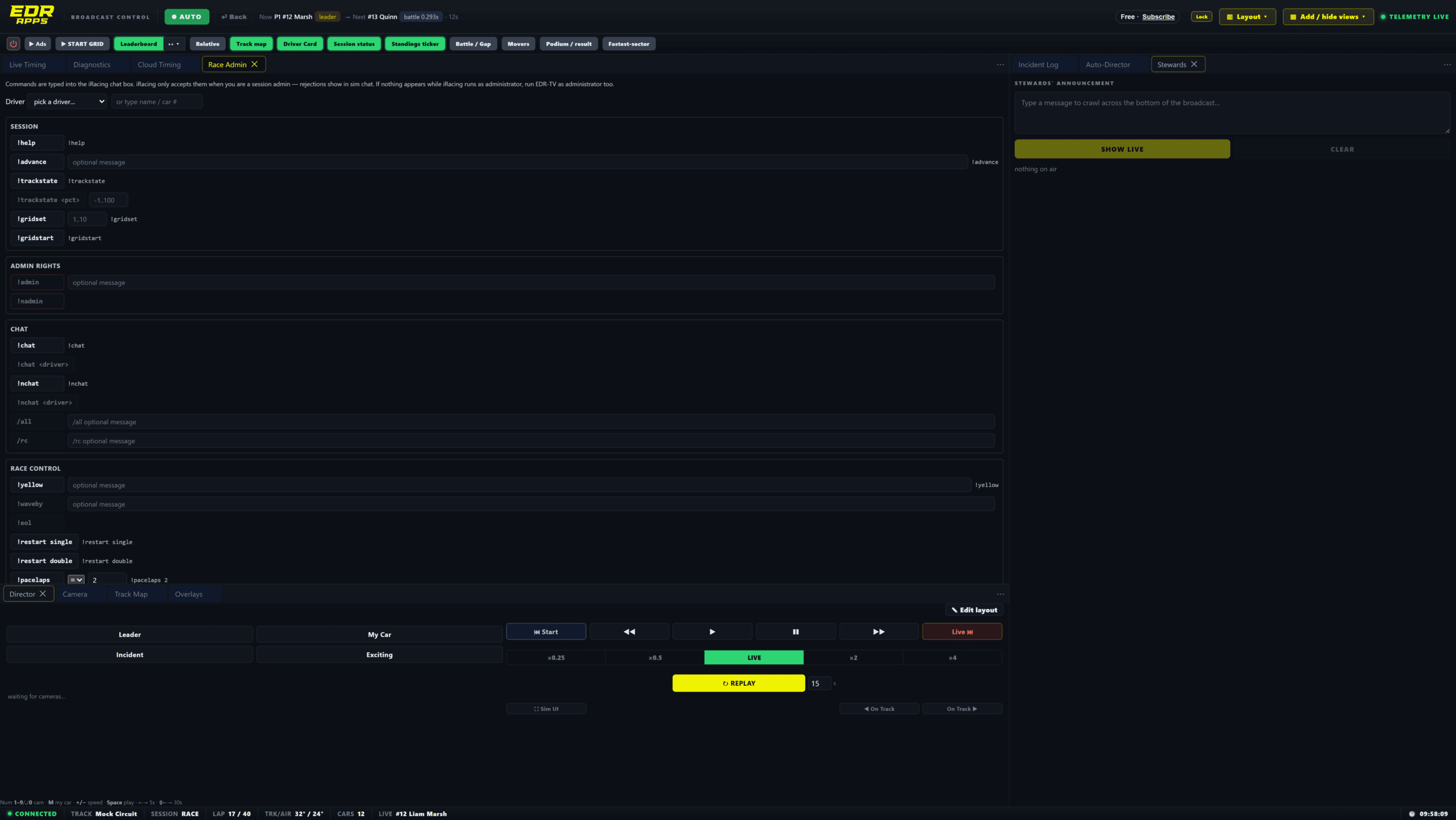
The value sits behind the graphics: one production surface for the decisions that keep a race understandable.
Who should use EDR Broadcast?
Production rule
The best iRacing broadcast software is the one that keeps the show readable when the race gets messy. Clean graphics matter, but workflow matters more.
EDR Broadcast resources
Start with the main EDR Broadcast page, then read the detailed iRacing broadcast tool comparison. For direct alternatives, read the ATVO comparison and SDK Gaming comparison. You can also check EDR Broadcast pricing or go straight to the contact page if you want help setting up a league broadcast workflow.
Related Endurotech Racing reading
Frequently Asked Questions
What is EDR Broadcast?
EDR Broadcast is iRacing broadcast software built for live league racing and endurance production. It helps with OBS overlays, camera direction, replay workflow and race-control messaging.
Who built EDR Broadcast?
EDR Broadcast was built by Endurotech Racing team members who wanted a better way to manage iRacing broadcasts during long endurance events.
Why was EDR Broadcast created?
It was created because camera direction, replay control, race admin and overlays took too much manual effort during 24 hour and long endurance races.
What is the best iRacing broadcast software for leagues?
For leagues that need more than a timing overlay, EDR Broadcast is built as a full race-night production tool with OBS overlays, Auto-Director, replay workflow and race-control features.
Does EDR Broadcast work with OBS?
Yes. EDR Broadcast is designed around OBS browser-source workflows so graphics can be added to a live stream cleanly.
Is EDR Broadcast only for professional broadcasters?
No. It is designed to help solo producers, league admins and commentary teams create a more professional show without needing a large crew.
Ready to upgrade your iRacing broadcast?
Start with EDR Broadcast and build a cleaner, lighter and more professional race-night production workflow for your league, commentary team or endurance event.
View EDR Broadcast Compare ToolsPlan availability: Theme Editor authoring is included with League and Enterprise. Pro includes the production tools and ready-made themes. Check current plan details before choosing a workflow.