iRacing multiclass broadcasting
How to Broadcast an iRacing Multiclass Race
Make multiclass iRacing easier to follow with class timing, traffic context, pit-cycle information, deliberate camera choices and clear commentary.
Quick answer
A good iRacing multiclass broadcast treats each class as a championship while showing how the classes interact. Use consistent class colours, class-first positions, pit-cycle context, a readable track map and camera rules that distinguish a real battle from faster traffic passing through.
Reviewed 19 July 2026
Written from Endurotech Racing’s endurance and broadcast experience. This guide covers production and commentary, not driving etiquette or sporting regulations.
What are you looking at?
Two cars from the same class are within one second
That is a class battle. Show class positions, the gap, current drivers and nearby traffic. Give it shot time unless a higher-priority race event intervenes.
A prototype is closing rapidly on a GT car
That is traffic until the data shows a same-class fight. Keep enough context for viewers to understand the speed difference, but do not call it an overtake for position.
The class leader pitted and dropped to fifth
Do not announce a lost lead without checking the cycle. Show pit state and compare with cars on the same strategy once stops settle.
Two class battles will meet in the same corner
This is premium multiclass television. Use a wider camera, keep class colours visible and let commentary explain the competing priorities before the traffic arrives.
The overall leader is alone but a lower class has a three-car fight
Show the fight. Overall status matters, but an uncontested leader does not deserve permanent camera ownership.
Overall position is not the main story
In multiclass racing, P12 overall can be P1 in class. A viewer who sees only the overall number may think the car is irrelevant when it is leading its race.
The broadcast should display class position more prominently whenever the focused car belongs to a multi-class field. Overall position still helps explain traffic order, but it should not overwrite the competition that determines the result.
| Graphic | Must show | Common mistake |
|---|---|---|
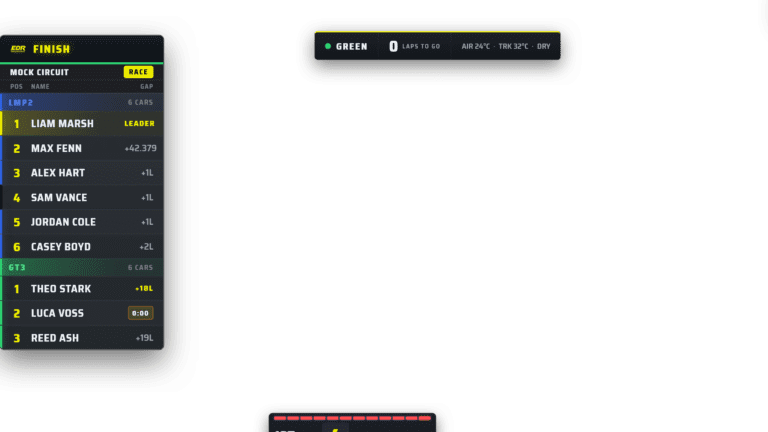
| Leaderboard | Clear class filter, class colour and gap reference | A 50-row overall tower nobody can read |
| Driver card | Class position, overall position, team and current driver | Showing only overall P12 |
| Battle box | Same-class rivals plus traffic approaching the fight | Treating every nearby car as position battle |
| Track map | Class colour, focused car and leaders | Identical dots with no story hierarchy |
| Results | Separate class results and overall context | Ending the show after only the overall podium |
Class colours must never drift
Choose one colour for each class before the season and use it everywhere: tower accents, map dots, driver cards, results, lower thirds and social graphics.
Do not rely on colour alone. Add a class label, car-category name or icon because viewers may have colour-vision differences or be watching a compressed mobile stream.
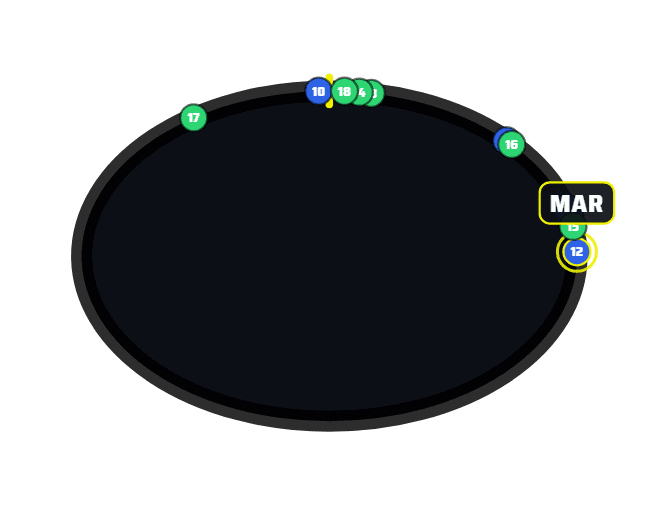
The map should explain where classes meet, not merely prove that cars are moving.
How to direct cameras through traffic
Show the approach
Move to the interaction before the faster class reaches the slower car. Viewers need the setup, not only the completed pass.
Use wider shots first
A wide trackside camera can show both battles and the closing traffic. Move tighter only when the picture remains understandable.
Hold through the decision
Do not cut at the exact braking point where both drivers choose a line. Let the shot resolve.
Protect same-class battles
Faster traffic matters because it changes the battle. Keep the class fight as the story unless the traffic creates a larger incident risk.
Avoid random onboards
An onboard can show closing speed, but it may hide the other class battle. Use it with purpose and return before the interaction disappears.
Expect the second prototype
The first pass changes lines and timing. A following faster car may arrive before the GT battle has recovered.
How an Auto-Director should understand multiclass
A basic camera script sees small gaps. A useful multiclass director also considers class, relative speed, traffic convergence, race state, repetition and shot duration.
A prototype that is 0.2 seconds behind a GT car is usually not a battle. Two GT cars 0.7 seconds apart may be fighting for the class lead while a prototype passes both. The system should distinguish those relationships and still let the human lock the camera when the race story is more important than the score.
EDR Broadcast’s Auto-Director is built to evaluate battles and race state, with manual override available whenever the producer needs it.
Pit cycles create false leaders
A car that has not stopped can appear to lead a class after the previous leader pits. That may be a genuine strategy move, or it may disappear when the cycle completes.
Commentary language that prevents confusion
| Avoid | Say instead |
|---|---|
| He takes the position | The prototype clears GT traffic; this is not for class position |
| They have dropped to fifth | They are fifth on track after the stop; the class cycle is still unfolding |
| The leader is P18 | They lead GT3 and run P18 overall |
| Traffic cost them two seconds | The gap grew by two seconds through traffic; we still need to separate traffic loss from pace |
A balanced coverage plan
Do not divide airtime mechanically by the number of classes. Coverage should follow meaningful competition, but each class needs regular state updates so its race does not disappear for an hour.
Multiclass rehearsal checklist
Confirm class colours and labels match on every overlay and the track map.
Test a class-filtered tower and an overall tower with the maximum expected field.
Check that a driver card shows both class and overall position correctly.
Run pit stops in every class and watch how leaders, gaps and stop state change.
Create mixed-class traffic and confirm cameras do not call every pass a battle.
Finish the session and verify each class result and podium can be shown.
Watch the recording on a phone with the sound off. The class story should still be visible.
Frequently asked questions
Should an iRacing multiclass leaderboard show overall or class position?
It should support both, but class position normally deserves the clearest emphasis because it determines the car’s competition.
How do I show three classes without a huge timing tower?
Use class filters, rotating class views, a compact persistent ticker and focused battle graphics. Do not keep the entire field visible at all times.
How should cameras treat faster-class traffic?
Treat it as traffic until it changes a same-class battle or becomes an incident risk. Show the approach and hold through the interaction.
What makes a good multiclass track map?
Consistent class colours, a highlighted focused car, clear leaders and enough contrast to read on a phone.
Does EDR Broadcast support multiclass racing?
Yes. EDR includes multiclass-aware timing and graphics. As the app remains in public beta, test your exact discipline, class mix and race procedures before a major event.
How often should the broadcast update each class?
There is no fixed interval, but no class should disappear long enough that viewers lose its order, pit cycle and main battle.
Continue building the endurance show
Use the full 6, 12 and 24 hour broadcast setup, give the crew role-specific live timing, and set up the incident and replay workflow before the field spreads out.
Make every class visible
Test EDR’s multiclass timing, track map, battle graphics and Auto-Director in a practice session before your next endurance broadcast.
Download EDR Broadcast Set Up the Scene